In many respects, Photoshop CS4 is just another computer program — you launch the program, open files, save files, and quit the program quite normally. Many common functions have common keyboard shortcuts. You enlarge, shrink, minimize, and close windows as you do in other programs.
Reviewing basic computer operations
Chapter 3 looks at Photoshop-specific aspects of working with floating panels, menus and submenus, and tools from the Options bar, but I want to take just a little time to review some fundamental computer concepts.
Launching Photoshop
You can launch Photoshop (start the program) by double-clicking an image file or through the Applications folder (Mac) or the Start menu (Windows). Mac users can drag the Photoshop program icon (the actual program itself) to the Dock to make it available for one-click startup. You can find the file named Adobe Photoshop CS4 inside the Adobe Photoshop CS4 folder, inside the main Applications folder. (Chapter 3 shows you the Photoshop interface and how to get around in the program.)
Never open an image into Photoshop from removable media (CD, DVD, your digital camera or its Flash card, Zip disks, jump drives, and the like) or from a network drive. Always copy the file to a local hard drive, open from that drive, save back to the drive, and then copy the file to its next destination. You can open from internal hard drives or external hard drives, but to avoid the risk of losing your work (or the entire image file) because of a problem reading from or writing to removable media, always copy to a local hard drive.
Showing posts with label Tutorial Photoshop CS4. Show all posts
Showing posts with label Tutorial Photoshop CS4. Show all posts
Friday, July 3, 2009

Thursday, July 2, 2009
Specialized software (Photoshop CS4)
Admittedly, Photoshop CS4 just plain can’t do some things. It won’t make you a good cup of coffee. It can’t press your trousers. It doesn’t vacuum under the couch. It isn’t even a substitute for iTunes, Microsoft Excel, or Netscape Navigator — it just doesn’t do those things.
However, there are a number of things for which Photoshop isn’t designed that you can do in a pinch. If you don’t have InDesign, you can still lay out the pages of a newsletter, magazine, or even a book, one page at a time. (With Bridge’s Ouput panel, you can even generate a multipage PDF document from your individual pages.) If you don’t have Dreamweaver or GoLive, you can use Photoshop to create a Web site, one page at a time, sliced and optimized and even with animated GIFs. You also have tools that you can use to simulate 3D in Photoshop CS4, such as Vanishing Point
Page layout in Photoshop isn’t particularly difficult for a one-page piece or even a trifold brochure. Photoshop has a very capable type engine, considering the program is designed to push pixels rather than play with paragraphs.
Photoshop even shows you a sample of each typeface in the Font menu. Choose from five sizes of preview in Photoshop’s Preferences➪Type menu. However, you can’t link Photoshop’s type containers, so a substantial addition or subtraction at the top of the first column requires manually recomposing all of the following columns. After all, among the biggest advantages of a dedicated page layout program are the continuity (using a master page or layout) and flow from page to page. If you work with layout regularly, use InDesign.
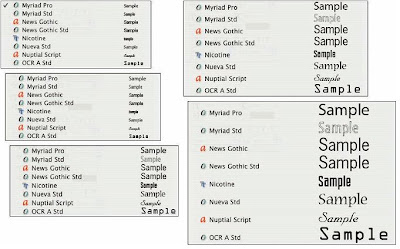 Font previews in five delicious flavors!
However, there are a number of things for which Photoshop isn’t designed that you can do in a pinch. If you don’t have InDesign, you can still lay out the pages of a newsletter, magazine, or even a book, one page at a time. (With Bridge’s Ouput panel, you can even generate a multipage PDF document from your individual pages.) If you don’t have Dreamweaver or GoLive, you can use Photoshop to create a Web site, one page at a time, sliced and optimized and even with animated GIFs. You also have tools that you can use to simulate 3D in Photoshop CS4, such as Vanishing Point
Page layout in Photoshop isn’t particularly difficult for a one-page piece or even a trifold brochure. Photoshop has a very capable type engine, considering the program is designed to push pixels rather than play with paragraphs.
Photoshop even shows you a sample of each typeface in the Font menu. Choose from five sizes of preview in Photoshop’s Preferences➪Type menu. However, you can’t link Photoshop’s type containers, so a substantial addition or subtraction at the top of the first column requires manually recomposing all of the following columns. After all, among the biggest advantages of a dedicated page layout program are the continuity (using a master page or layout) and flow from page to page. If you work with layout regularly, use InDesign.
 Font previews in five delicious flavors!
Dreamweaver is a state-of-the-art Web design tool, with good interoperability with Photoshop. However, if you don’t have Dreamweaver and you desperately need to create a Web page, Photoshop comes to your rescue. After laying out your page and creating your slices, use the Save for Web & Devices command to generate an HTML document (your Web page) and a folder filled with the images that form the page . One of the advantages to creating a Web page in Dreamweaver rather than Photoshop is HTML text. (Using Photoshop, all the text on your Web pages is saved as graphic files. HTML text not only produces smaller Web pages for faster download, but it’s resizable in the Web browser.)
 You can create an entire Web page in Photoshop.
 You can create an entire Web page in Photoshop.
Photoshop CS4 and Photoshop CS4 Extended
Although there have been different versions of Photoshop for years (Photoshop versus Photoshop LE versus Photoshop Elements), as with the prior release of Photoshop, Adobe is offering two different versions of Photoshop CS4. Photoshop CS4 and Photoshop CS4 Extended both have all of Photoshop’s powerful image-editing, vector-drawing, painting, and type capabilities. Photoshop CS4 Extended also includes some very specialized, highly technical features for use in science, research, and video editing, and for use with 3D modeling programs.
So, if you have Photoshop CS4 rather than Photoshop CS4 Extended, should you feel cheated or like a second-class citizen? Nope! Unless you specifically need those extended features, there’s no real reason to purchase them. But what if you got Photoshop CS4 Extended as part of a Creative Suite or Adobe Bundle package of software — did you pay forsomething you don’t need? Well, sort-of-yeahbut-not-really. The folks who’re really paying extra for the extended features are those who purchase Photoshop CS4 Extended as a standalone program. The additional cost they pay funds the research and development of the extended features.
So why didn’t I get to choose between Photoshop CS4 and Photoshop CS4 Extended when I ordered my Bundle or Suite? Buying software shouldn’t be as complicated as, say, ordering a cup of coffee. (Caf, de-caf, half-caf? Latte, espresso, cappuccino? White, brown, or raw sugar? Cream, half-and-half, milk, or skim? Small, medium, large, super, or el grosso maxmo?) It could get quite confusing. Imagine trying to wade through all of the thousands of products if Adobe marketed every possible combination as a separate Bundle or Suite or Studio! You’d spend so much time trying to find your perfect bundle, you’d never get to use the software.
So, if you have Photoshop CS4 rather than Photoshop CS4 Extended, should you feel cheated or like a second-class citizen? Nope! Unless you specifically need those extended features, there’s no real reason to purchase them. But what if you got Photoshop CS4 Extended as part of a Creative Suite or Adobe Bundle package of software — did you pay forsomething you don’t need? Well, sort-of-yeahbut-not-really. The folks who’re really paying extra for the extended features are those who purchase Photoshop CS4 Extended as a standalone program. The additional cost they pay funds the research and development of the extended features.
So why didn’t I get to choose between Photoshop CS4 and Photoshop CS4 Extended when I ordered my Bundle or Suite? Buying software shouldn’t be as complicated as, say, ordering a cup of coffee. (Caf, de-caf, half-caf? Latte, espresso, cappuccino? White, brown, or raw sugar? Cream, half-and-half, milk, or skim? Small, medium, large, super, or el grosso maxmo?) It could get quite confusing. Imagine trying to wade through all of the thousands of products if Adobe marketed every possible combination as a separate Bundle or Suite or Studio! You’d spend so much time trying to find your perfect bundle, you’d never get to use the software.
Other things you can do with Photoshop
Although Photoshop isn’t a page layout or illustration program, you certainly can produce simple brochures, posters, greeting cards, and the like using
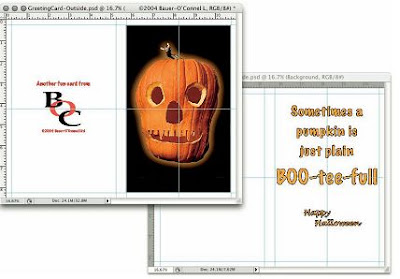 only Photoshop. One of the features that sets Photoshop apart from basic image editors is its powerful type engine, which can add, edit, format, and stylize text as capably as many word-processing programs. Photoshop even has a spell check feature — not bad for a program that’s designed to work with photos, eh?
Even if you don’t have the high-end video features found in Photoshop CS4 Extended, you can certainly supplement your video-editing program with Photoshop CS4 (even if Photoshop can’t open and play movies you capture with your video camera). From Adobe Premiere (or other professional video programs), you can export a series of frames in the FilmStrip format, which you can open and edit in Photoshop.
 only Photoshop. One of the features that sets Photoshop apart from basic image editors is its powerful type engine, which can add, edit, format, and stylize text as capably as many word-processing programs. Photoshop even has a spell check feature — not bad for a program that’s designed to work with photos, eh?
Even if you don’t have the high-end video features found in Photoshop CS4 Extended, you can certainly supplement your video-editing program with Photoshop CS4 (even if Photoshop can’t open and play movies you capture with your video camera). From Adobe Premiere (or other professional video programs), you can export a series of frames in the FilmStrip format, which you can open and edit in Photoshop.
Wednesday, July 1, 2009
What Photoshop is designed to do
Adobe Photoshop is an image-editing program. It’s designed to help you edit images — digital or digitized images, photographs, and otherwise. This is the core purpose of Photoshop. Over the years, Photoshop has grown and developed, adding features that supplement its basic operations. But at its heart, Photoshop is an image editor. At its most basic, Photoshop’s workflow goes something like this: You take a picture, you edit the picture, and you print the picture (as illustrated in Figure 1-1).
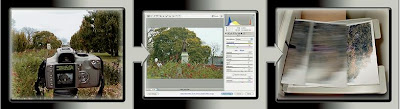 Basic Photoshop: Take photo, edit photo, print photo. Drink coffee (optional)
 Basic Photoshop: Take photo, edit photo, print photo. Drink coffee (optional)
Whether captured with a digital camera, scanned into the computer, or created from scratch in Photoshop, your artwork consists of tiny squares of color, which are picture elements called pixels. (Pixels and the nature of digital imaging are explored in depth in Chapter 2.) Photoshop is all about changing and adjusting the colors of those pixels — collectively, in groups, or one at a time — to make your artwork look precisely how you want it to look. (Photoshop, by the way, has no Good Taste or Quality Art filter. It’s up to you to decide what suits your artistic or personal vision and what meets your professional requirements.) Some very common Photoshop image-editing tasks are shown in Figure 1-2: namely, correcting red-eye and minimizing wrinkles .
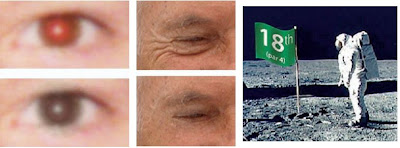 Some common Photoshop tasks.
 Some common Photoshop tasks.
New in Photoshop CS4 is the powerful ability to rotate the image on screen while you’re working. Not rotate the image itself — Photoshop has had that capability for ages — but to rotate the appearance of the image in the workspace. This is especially handy when doing delicate masking and painting, enabling you to orient the image on screen to best suit your stroke. As you can see in Figure 1-3, while you’re rotating, a red arrow indicates the image’s true “up.” Double-clicking the Rotate tool icon in the Toolbox restores the image’s orientation. (This feature is not available on older computers with less powerful video cards.)
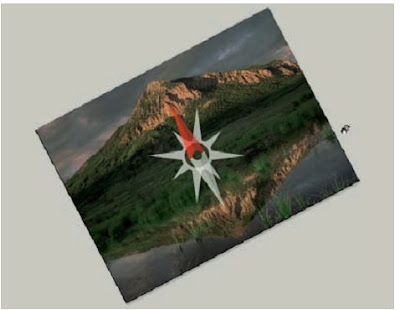

Rotate while you work, without damaging the image’s quality!
Over the past few updates, Photoshop has developed some rather powerful illustration capabilities to go with its digital-imaging power. Although Photoshop is still no substitute for Adobe Illustrator, Photoshop certainly can serve you well for smaller illustration projects. (Keep in mind that Photoshop is a raster art program — it works with pixels — and vector artwork is only simulated in Photoshop.) Photoshop also has a very capable brush engine, which makes it feasible to paint efficiently on your digital canvas. Figure 1-4 shows a comparison of raster artwork (the digital photo, left), vector artwork (the illustration, center), and digital painting (right). The three types of artwork can appear in a single image, too.
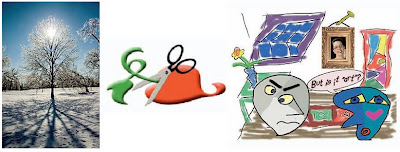 You can use Photoshop with raster images, vector artwork, and even to paint.
 You can use Photoshop with raster images, vector artwork, and even to paint.
Photoshop CS4 includes some basic features for creating Web graphics, including slicing and animations (but Web work is best done in a true Web development program, such as Dreamweaver). Photoshop’s companion program Adobe Bridge even includes the Output panel to help you create entire Web sites to display your artwork online and PDF presentations for on-screen display, complete with transition effects between slides.
Exploring Adobe Photoshop
Photoshop is used for an incredible range of projects, from editing and correcting digital photos to preparing images for magazines and newspapers to creating graphics for the Web. You can also find Photoshop in the forensics departments of law-enforcement agencies, scientific labs and research facilities, and dental and medical offices, as well as in classrooms, offices, studios, and homes around the world. As the Help Desk Director for the National Association of Photoshop Professionals (NAPP), my team and I solve problems and provide solutions for Photoshop users from every corner of the computer graphics field and from every corner of the world. People are doing some pretty amazing things with Photoshop, many of which are so far from the program’s original roots that it boggles the mind!
Welcome to Photoshop!
Adobe Photoshop is, without question, the leading image-editing program in the world. Photoshop has even become somewhat of a cultural icon.It’s not uncommon to hear Photoshop used as a verb (“That picture is obviously Photoshopped!”), and you’ll even see references to Photoshop in the daily comics and cartoon strips. And now you’re part of this whole gigantic phenomenon called Photoshop.
Whether you’re new to Photoshop, upgrading from Photoshop CS3 or earlier, or transitioning from Elements to the full version of Photoshop CS4 or Photoshop CS4 Extended, you’re in for some treats. Photoshop CS4 has an intriguing new look that enables you to do more, and do it more easily, than ever. Before I take you on this journey through the intricacies of Photoshop, I want to introduce you to Photoshop in a more general way. In this chapter, I tell you what Photoshop is designed to do, what it can do (although not as capably as job-specific software), and what you can get it to do if you try really, really hard. I also review some basic computer operation concepts and point out a couple of places where Photoshop is a little different than most other programs. At the end of the chapter, I have a few tips for you on installing Photoshop to ensure that it runs properly.
Whether you’re new to Photoshop, upgrading from Photoshop CS3 or earlier, or transitioning from Elements to the full version of Photoshop CS4 or Photoshop CS4 Extended, you’re in for some treats. Photoshop CS4 has an intriguing new look that enables you to do more, and do it more easily, than ever. Before I take you on this journey through the intricacies of Photoshop, I want to introduce you to Photoshop in a more general way. In this chapter, I tell you what Photoshop is designed to do, what it can do (although not as capably as job-specific software), and what you can get it to do if you try really, really hard. I also review some basic computer operation concepts and point out a couple of places where Photoshop is a little different than most other programs. At the end of the chapter, I have a few tips for you on installing Photoshop to ensure that it runs properly.
Subscribe to:
Posts (Atom)